Style by reference for virtual staging is the option to use when a preset style is not specific enough. Instead of picking 'modern' or 'Scandinavian' from a list, you upload an image that shows the exact look you want — a magazine shot, your agency's moodboard, a past listing that sold well — and PhotoStaging matches that look on your property photos. This guide explains how it works, when it beats presets, how to choose a furniture style for a listing, and how to turn a handful of reference images into a repeatable brand asset.
What style by reference actually does
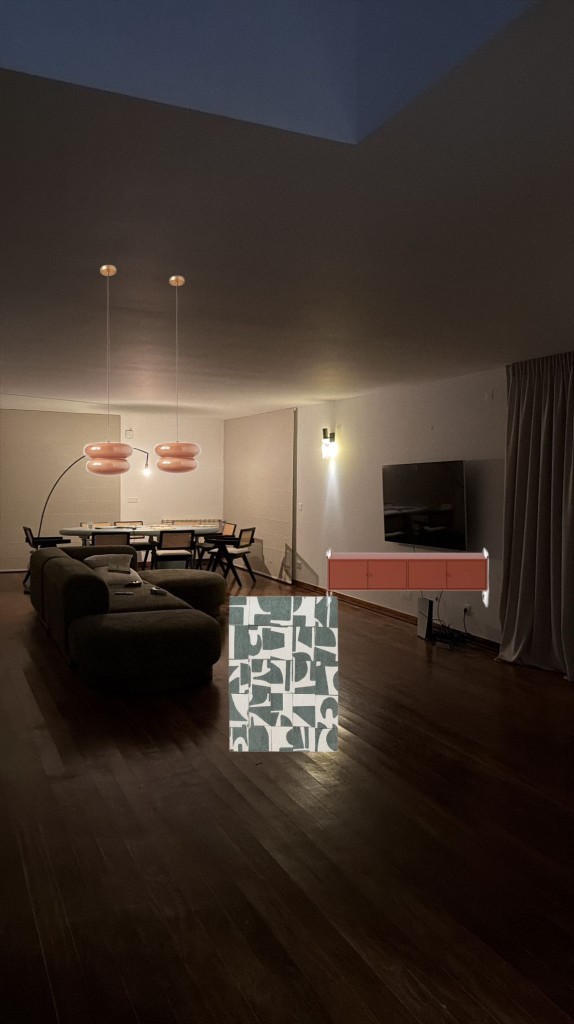
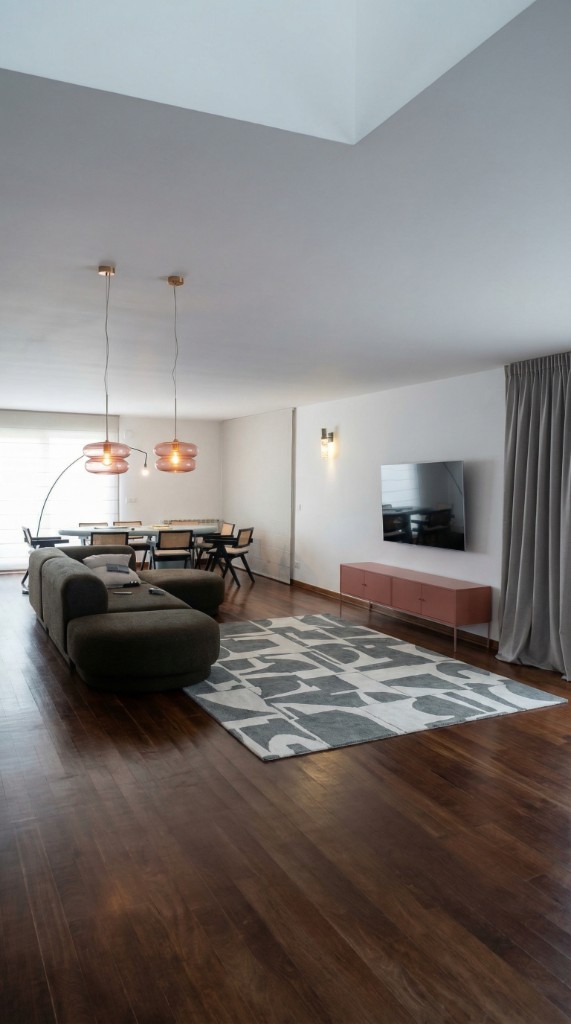
You provide a reference image alongside the listing photo. The AI reads the style cues in the reference — color palette, materials, furniture forms, decor density, even the mood of the lighting — and applies them to your room while keeping your room's real walls, floor, windows, and perspective. The reference tells the AI *how* to furnish; your photo tells it *where*.
It is not a copy-paste of the reference furniture into your photo. If the reference shows a long grey sofa under a gallery wall, your living room gets a sofa of similar tone and form placed where it fits your layout, with art that matches the feel — not the exact same objects in the exact same positions.
Can you choose the furniture style in virtual staging?
Yes, and you have two levels of control. The first is presets: in PhotoStaging you pick a direction like Scandinavian, modern, transitional, minimal, or coastal and the pre-built prompts handle palette, materials, and decor. This is fast and is the right choice for most one-off listings. The second level is style by reference, which you use when you need a specific look that a preset name does not capture, or when you want every listing to look like it came from the same agency.
Choose the style for the buyer you expect, not for your own taste. As a starting point:
- Scandinavian: broad appeal and soft warmth — the safe default for apartments and first-time-buyer homes
- Modern: clean lines and an urban feel — city flats, lofts, new builds
- Transitional: balanced, slightly softer — family homes and suburban listings
- Minimal: fewer pieces, more visible floor — studios and compact rooms
- Coastal, rustic, or industrial: only where the location and architecture already suggest it
Prompt vs reference image
Presets and short prompts are quickest for a single listing. A reference image is better when you need consistency across several rooms or several listings, or when a client has a specific expectation ('make it look like our show flat'). Many agents use both: a preset for standard stock, a reference for premium or branded listings.
Can you change the style after generating?
Yes. Regenerating with a different preset or reference takes another 20–30 seconds and one credit, so it is cheap to try two directions on the hero image before committing to the whole listing.
When it is better than preset styles
Reference-based staging wins in four situations:
- your agency has a brand aesthetic that no preset name covers
- you need every listing in your portfolio to feel visually consistent — the same 'signature' across your website and social feed
- you are selling a specific lifestyle or niche (boutique, high-end, eco, coastal, holiday rental)
- a developer or seller has a show unit or brochure and wants the digital staging to match it
How the workflow looks
The process is short and repeatable — one extra upload compared with preset staging.
Style by reference in PhotoStaging
Upload a reference image, apply its style to a listing photo, and compare the result.
1. Pick the right reference image
Clear, well-lit interior photos work best. Choose a reference that shows the same room type (a living room for a living room), with a similar amount of furniture to what you want, and without heavy filters or dramatic color grading. A reference that is itself a great listing photo is ideal.
2. Upload the listing photo and the reference
Enhance the listing photo first if it is dark or color-shifted — see real estate photo enhancement. Then select style by reference, upload both images, and generate.
3. Apply it across the listing
Use the same reference for every room of the listing so the whole gallery reads as one home. For room types your reference does not cover (a bedroom when the reference is a living room), pick a second reference in the same style family. The full framework is in how to match furniture style in virtual staging.
Keeping consistency across rooms and listings
Consistency is what makes staged listings look intentional rather than generated. Three rules cover most of it: one core style per listing, minor variation only at room level (an accent color, a plant, bedding tone), and the same reference library across your whole portfolio so your brand is recognizable on the portal thumbnail before the buyer even reads your name.
If you are undecided between the two most popular directions, Scandinavian vs modern staging for listings compares them by property type and buyer profile.
Typical use cases
Reference-driven staging is particularly strong for:
- boutique agencies with a defined visual identity
- luxury listings with specific styling expectations from the seller
- developers who want digital staging to match a physical show unit
- agencies that want every listing to feel like a coherent collection on their website and Instagram
Getting started
Save three to five reference images as your brand library — one per main room type — and reuse them on every listing. Only use images you have rights to: your own past listings, licensed stock, or internal brand imagery. Read custom interior style for property marketing for how to turn this into a repeatable brand asset, then try it in PhotoStaging — your first images are free.
Frequently asked questions
Can I use any image as a reference?
You should only use images you have rights to. Your own previous listings, licensed stock, and internal brand imagery work well. Avoid heavily filtered images — they make the result look artificial.
Do I need a new reference per listing?
No. Most agents build a small library of three to five reference images, one per room type, and reuse them across every listing.
Does style by reference preserve my original room?
Yes. Walls, floors, windows, and architecture are preserved. Only the furnishing and decor adopt the reference style.
Can I choose a furniture style without a reference image?
Yes. Pick a preset direction such as Scandinavian, modern, or minimal and the pre-built prompts handle the details. Use a reference only when you need a more specific look.
Should all rooms use the same style?
Usually yes. One core style per listing, with small room-level variations, makes the gallery feel intentional and credible.
Ready to start?
Create listing-ready visuals in minutes. No credit card required.