An AI renovation preview is an AI-edited photo that shows an existing room as it would look after renovation — new floors, kitchen fronts, paint, and fixtures — while keeping the real walls, windows, ceiling height, and camera angle. It starts from a photo of the room as it is today, dated, damaged, or still under construction, and solves the oldest problem in selling property that needs work: most buyers cannot picture the finished result, so they discount the price or walk away. This guide explains what renovation preview is and is not, where it pays off, how to brief it so the output is believable, how to disclose it, where to use it in your marketing, and what it cannot do.
What AI renovation preview is — and what it is not
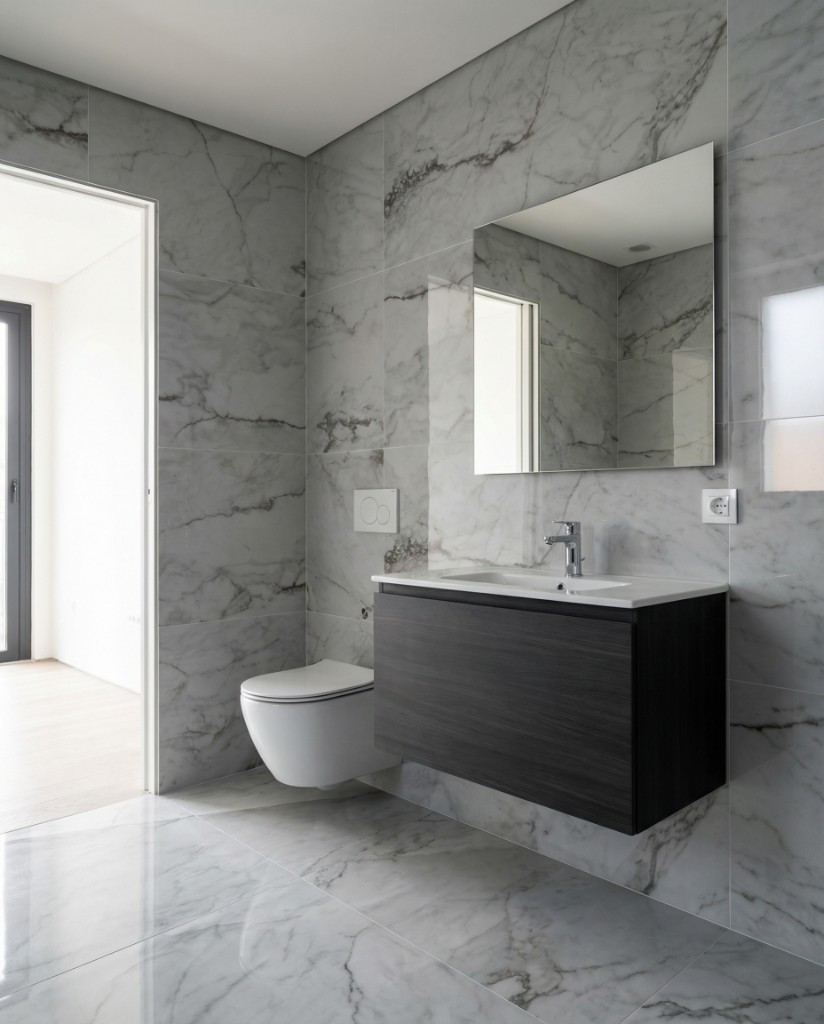
A renovation preview starts from your photograph. The tool keeps the walls, window positions, ceiling height, door openings, and camera angle, and changes only the finishes: flooring, wall color, cabinetry, countertops, tiles, bathroom fixtures, lighting, and sometimes the furniture layout. The output is a photo-realistic concept of the same room after a refurbishment, generated in about 20–30 seconds.
It sits between two tools agents already know. Virtual staging adds furniture and decor to a room that is otherwise fine; it does not touch the fabric of the property. A 3D render rebuilds the room from plans, which is why renders are slower and costlier to produce and often look like a game rather than a photograph. Renovation preview keeps the realism of a photo and the flexibility of a render, at the cost of one image credit.
That difference matters for how buyers read the image. Because the geometry is real, a buyer who visits the property recognizes the room immediately. The preview is not a fantasy of a different house; it is the same house with the work done. If you want the staging side of the story, the pillar on virtual home staging covers it in depth.
Renovation preview vs. virtual staging vs. 3D rendering
Use virtual staging when the room is finished but empty or badly furnished. Use renovation preview when the finishes themselves are the problem — a 1980s kitchen, a bathroom with cracked tiles, a concrete shell during construction. Use a full 3D render when the property does not exist yet and there is nothing to photograph, or when you need exact material specs for a planning application.
Where renovation preview earns its keep
Renovation preview is not a tool for every listing. A move-in-ready apartment does not need it. It changes outcomes when the current state of the property actively suppresses demand, or when there is nothing finished to show yet.
Fixer-uppers and inherited homes
The typical probate or estate sale has decades of wear, dark wood, patterned carpets, and a kitchen nobody has touched since the 1990s. Buyers who could afford the renovation still struggle to see past the current state, and the ones who can see past it expect a discount for the imagination they are supplying. One preview per key room — kitchen, main bathroom, living room — removes that discount from the conversation. The buyer sees the target, and the negotiation moves to the cost of getting there.
Investor flips and buy-to-renovate
Investors already think in end values. A preview lets an agent present a property as a project with a visible outcome instead of a problem with an unknown one. It is also useful on the exit: a flipper who buys with a preview in hand can list the finished property with a genuine before-and-after story, which performs well on portals and social.
Off-plan and pre-construction units
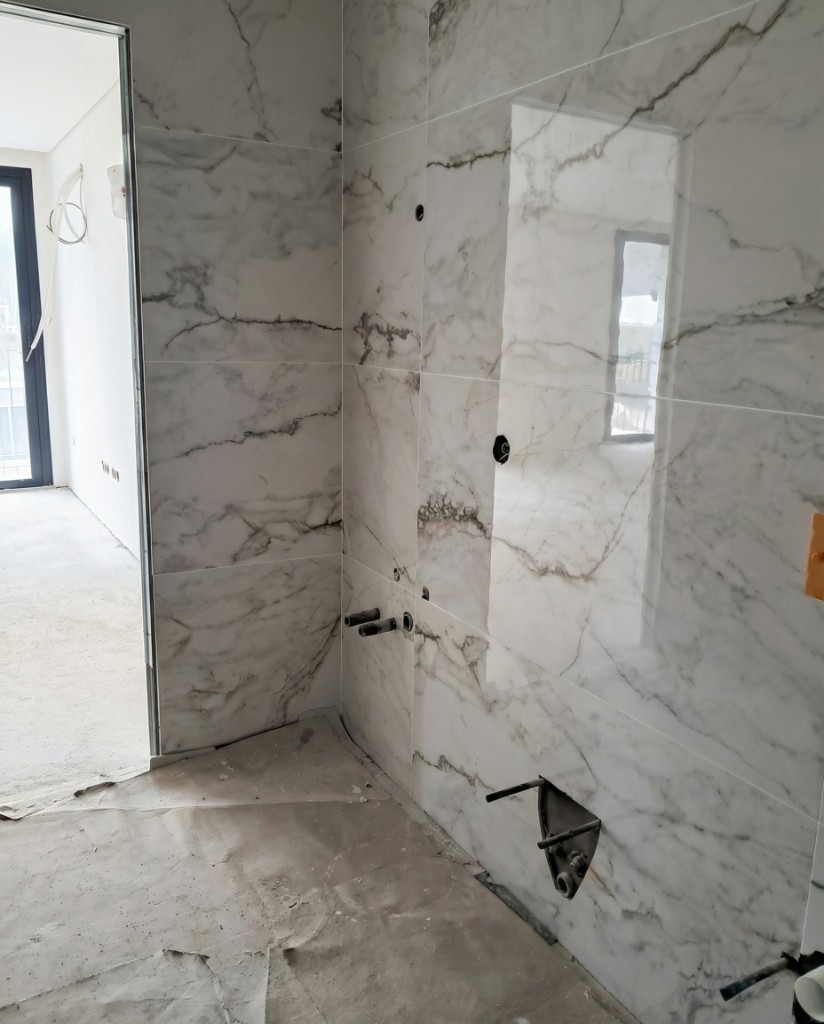
During construction the only photos you can take are of bare screed, exposed services, and taped windows. Renovation preview turns a site photo of a specific unit into a finished-look image of that unit, with the actual window and room proportions, before the developer's model unit exists. The dedicated guide on pre-construction listings visual marketing covers how to keep those previews consistent across a whole development.
Rentals due for refurbishment and auction lots
Landlords marketing a unit that will be refurbished between tenancies can show prospective tenants the finished standard rather than the outgoing tenant's belongings. Auction properties, which are often sold in poor condition with short marketing windows, benefit from a preview in the catalog that signals what a bidder is really buying: the potential, not the peeling paint.
How to brief a renovation preview so it looks believable
The most common failure is not a technical one; it is over-ambition. A preview that changes everything at once — floor, walls, kitchen, layout, lighting — stops looking like the room and starts looking like a stock image. Buyers sense it even if they cannot say why. A few working rules keep the output credible.
For the full campaign approach, including how to sequence the images in a listing, see how to show property potential before renovation.
- One meaningful change per generation. New kitchen fronts and countertops first; if that works, a second pass for flooring. Stacking changes compounds errors.
- Keep the structure. Do not ask for windows to be enlarged, walls removed, or ceilings raised. The moment the geometry changes, the image becomes a misrepresentation rather than a preview.
- Match finishes to the price point. A €180,000 apartment should not preview with a marble island and brass fittings. Buyers at that level know what the budget buys, and the mismatch undermines everything else in the listing.
- Start from a clean, well-exposed photo. Clutter, poor light, and a tilted horizon carry into the result. Fix the input first with real estate photo enhancement if you need to.
- Shoot the same angle you will use for the before image. The pair only works if a buyer can line the two up at a glance.
Ethics, disclosure, and what you must never do
Renovation preview is legitimate marketing when a buyer can tell instantly that it is a concept. It is misrepresentation when it is presented as the current condition of the property. Portal terms, MLS rules, and consumer protection law differ in wording from market to market, but most draw the line in that place — check your MLS, board, or portal for the exact requirements.
The practical standard is simple. Label every preview image, in the image caption and ideally on the image itself, with wording such as "Renovation preview — concept only" or "AI visualization of proposed refurbishment." Always publish the original photo alongside it, so nobody has to ask what the room looks like today. And never present a preview as the first or only image of a room without its unedited counterpart.
There are also things a preview should never contain, regardless of labeling. Do not add windows, doors, or rooms that do not exist. Do not remove structural walls or chimney breasts. Do not change the view through a window. Do not add square footage. A buyer who reads a label as "the finishes are indicative" is not agreeing to "the floor plan is fiction." Renovation preview keeps the architecture because that is the only version of the tool that is honest.
A disclosure checklist that satisfies most rule sets
These five points cover most rule sets; confirm the exact wording with your MLS, board, or portal.
- Visible label on or directly under every preview image
- Original photo of the same room published in the same gallery
- Listing description states that renovation visuals are indicative and not a specification
- No structural, dimensional, or view changes in any preview
- The same disclosure carried into brochures, social posts, and agent presentations
How renovation preview works in PhotoStaging
PhotoStaging runs renovation preview as one of its pre-built workflows, so there is no prompt writing. Upload the current-state photo, choose Renovation Preview, and the tool returns a finished-look version of the room in about 20–30 seconds as a full-resolution JPEG. Each generated image uses one credit; if you want a different direction, generate another variation for another credit and keep the one that fits the buyer profile.
The bathroom pair at the top of this article is a typical case: a site photo taken mid-construction, and the same bathroom previewed with a fitted vanity, tiling, and fixtures on the real layout. If a particular room is giving you trouble — mixed light, heavy clutter, an unusual angle — support on WhatsApp can suggest how to shoot or brief it.
Plans start at €29 per month for 100 credits and €69 per month for 300; annual plans (€290 for 1,200 credits, €690 for 3,600) bring the cost down to roughly €0.19–€0.24 per image. New accounts get 10 free credits with no card required, which is enough to test a kitchen, a bathroom, and a living room before deciding.
Renovation Preview tutorial
See how to turn current-state photos into finished renovation previews.
Where to use renovation previews in your marketing
A preview does most of its work in the first few seconds a buyer spends with a listing, but it has a life beyond the portal gallery. Think of it as one asset with several placements.
Portal gallery and listing page
Keep the current-state photo as the first image so the listing is honest at a glance, and place the preview second with its label. Buyers who scroll see the potential immediately; buyers who do not scroll are not misled. Some agents reverse this for properties in very poor condition, leading with the labeled preview; it can lift click-through but it must be paired with the original in the very next slot.
Brochures, investor decks, and open-house boards
In print, before-and-after pairs on a single spread are the strongest format. For investor decks, a preview per key room next to a rough scope of works lets the reader connect image to budget. At an open house, an A3 board in the room being previewed — the dated kitchen with the previewed kitchen beside it — gives visitors something to talk about in the exact place the objection would otherwise form.
Social carousels and follow-up
Before-and-after carousels suit social feeds because the payoff is immediate. Post the original first, the preview second, and a third slide with the disclosure and the listing link. In post-viewing follow-up emails, attach the preview of the room the buyer hesitated over. The agent-side workflow, from listing presentation to negotiation, is covered in AI renovation visualization for realtors.
How to measure whether it is working
Because renovation preview is cheap, the temptation is to add it everywhere and never check. A few simple comparisons tell you whether it is doing anything.
Track inquiries by source on listings with and without previews, and note how many come from investors or buyers who mention the renovation in their first message. Track time from listing to first offer on properties in comparable condition. Track viewing-to-offer ratios: a preview should reduce the number of visitors who arrive, see the state of the kitchen, and leave without a conversation. If none of these move over a dozen or so listings, review the briefing — the previews may be too ambitious for the price point or the disclosure may be making buyers wary rather than confident.
Limitations you should be upfront about
A renovation preview is a picture, not a plan. It does not know whether the wall behind the new kitchen run can take the weight, whether the drainage allows the shower to move, or whether the joists under the new tiles are sound. It cannot replace a structural survey, a building inspection, or a contractor's quote, and you should say so in any material that includes it.
It also implies nothing about cost. Two previews that look equally finished can represent very different budgets depending on what is behind the walls. Investors know this; first-time buyers often do not. Pair previews with a rough scope of works or a recommendation to get quotes, rather than letting the image stand alone as a promise.
Finally, the output is only as good as the input. A blurry, dark, or heavily cluttered photo produces a preview that inherits those problems. If the room cannot be photographed cleanly, it is better to skip the preview than to publish a weak one.
Next steps
If you are new to AI visuals, start with the pillar on virtual home staging to understand where staging stops and renovation preview begins. For a campaign structure around dated properties, read how to show property potential before renovation. If you sell off-plan, go to pre-construction listings visual marketing.
Start with PhotoStaging — your first images are free.
Frequently asked questions
Is AI renovation preview allowed in property listings?
Yes, in most markets, provided it is clearly labeled as a concept and shown alongside the current-state photo. It must never be presented as the actual condition of the property, and it should not alter structure, dimensions, or views. Rules vary, so check your MLS, board, or portal for exact wording.
How is renovation preview different from virtual staging?
Virtual staging adds furniture and decor to a room whose finishes are already acceptable. Renovation preview changes the finishes themselves — floors, kitchen fronts, tiles, paint, fixtures — while keeping the real architecture. Many listings use both: preview the renovation first, then stage the result.
Does a renovation preview replace architectural drawings or a survey?
No — a renovation preview is a marketing visualization, not a technical document. It cannot tell you whether a change is structurally possible, how much it costs, or whether it needs permits. Use it to communicate potential, and pair it with professional advice for anything a buyer will rely on.
Can I use renovation previews for pre-construction sales?
Yes. Photograph the actual unit during construction and preview it to the developer's specification. Keep finishes consistent across units and label every image as a concept. The pre-construction guide covers the full approach.
How many preview variations should I generate per room?
Usually one to three variations per room. Generate the most likely direction first, and only try alternatives if the first does not suit the buyer profile or the price point. Publishing several competing versions of the same room confuses buyers rather than helping them.
What kind of photo works best as the starting point?
The best starting point is a sharp, evenly lit, uncluttered shot taken from a corner at roughly chest height, showing the full room including the floor and at least one window. Enhance exposure and color before generating the preview if the original is dark or flat.
How much does a renovation preview cost in PhotoStaging?
A renovation preview costs one credit per image. Monthly plans are €29 for 100 credits or €69 for 300; annual plans are €290 for 1,200 credits or €690 for 3,600, roughly €0.19–€0.24 per image. New accounts get 10 free credits without a card.
Ready to start?
Create listing-ready visuals in minutes. No credit card required.