Virtual home staging uses AI to furnish property photos digitally, turning empty rooms into listing-ready visuals that buyers can picture themselves living in. Agents and brokers use it to cut time on market, stand out on portals, and skip the cost and scheduling of physical staging. This guide covers what virtual home staging is, when it pays off, how long it takes, whether the results look real, how to pick a furniture style, and how to run it inside your listing workflow — with PhotoStaging or any other tool.
What virtual home staging actually is
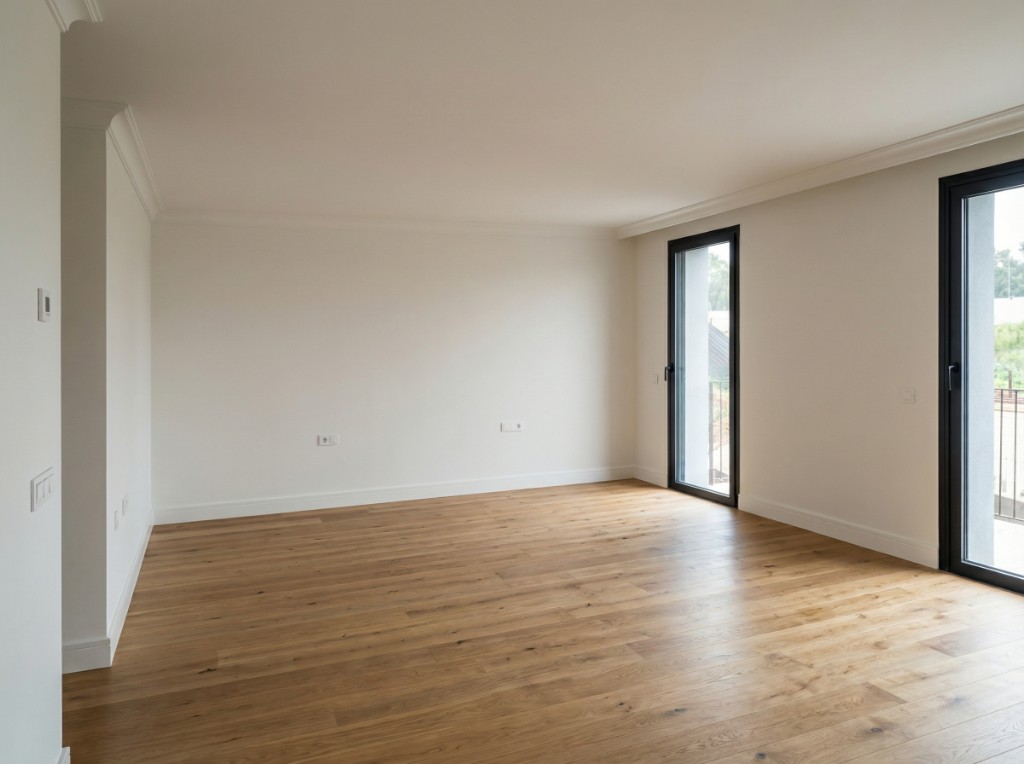
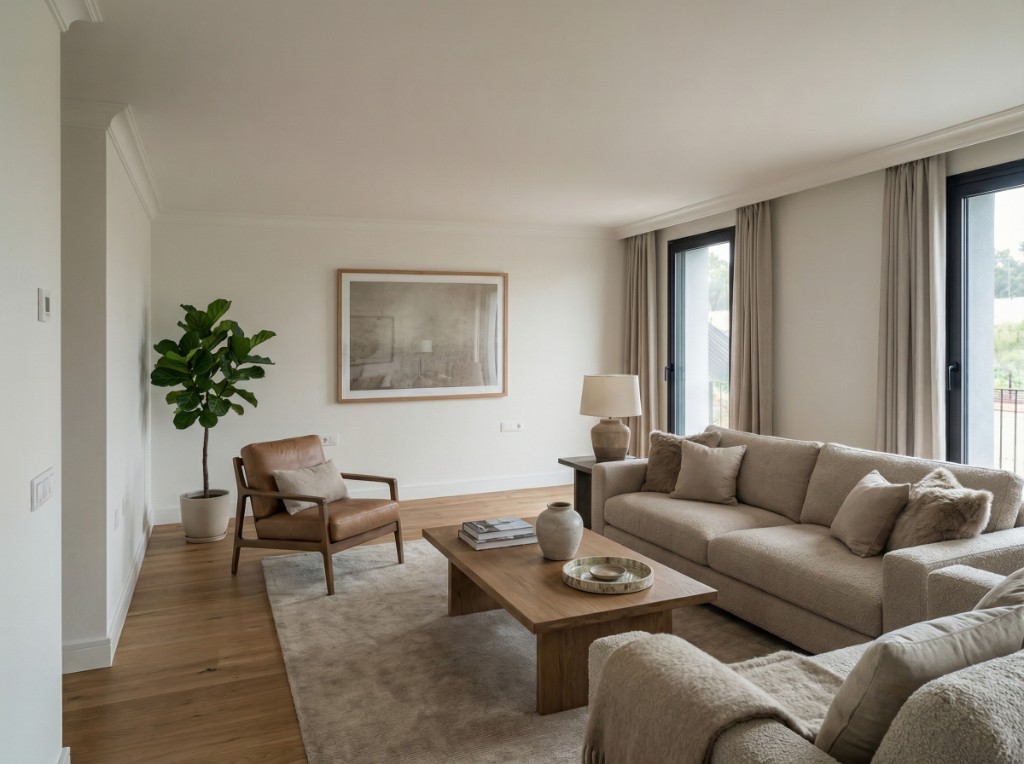
Virtual home staging means adding furniture, decor, and styling to a real estate photo digitally, without moving a single piece of physical furniture into the property. The result is a realistic, marketing-ready image rendered directly over your original photo. With an AI tool like PhotoStaging, you upload the photo, pick a room type and style, and get the staged image back in about 20–30 seconds.
It is not the same as 3D rendering or CGI. A render rebuilds the whole scene from scratch, which is why renders often look like video games. Virtual staging keeps the real walls, floors, windows, and light direction from your photo and only generates the movable elements on top — sofa, bed, table, rug, art, plants. That is why a good staged image still reads as a photograph of that specific room.
It is also different from traditional staging, where a company delivers and arranges real furniture for the duration of the sale. Traditional staging looks great in person and in photos, but it costs hundreds to thousands per month, takes days to schedule, and only makes sense for higher-value listings. Virtual staging costs cents per image and works for any price point.
When virtual home staging makes sense for a listing
Virtual staging tends to beat empty or as-is photos whenever buyers struggle to read the space. In practice, that is most listings that are not already professionally furnished.
- empty or partially empty properties (vacant homes, after tenants leave, estate sales)
- homes with dated, mismatched, or cluttered furniture that distracts from the architecture
- properties being repositioned for a different buyer profile (family home shown as a young-professional flat, or the reverse)
- new-build and pre-construction units that have no furniture yet
- listings that need to go live within 24 hours and cannot wait for a staging company
- rentals and short-term lets where physical staging would never pay back
When you probably do not need it
If the property is already furnished tastefully and photographed well, staging adds little. In that case real estate photo enhancement — fixing exposure, color, and dull skies — is usually the better first step. The two workflows combine well: enhance first, then stage the rooms that need it.
How virtual staging helps sell homes faster
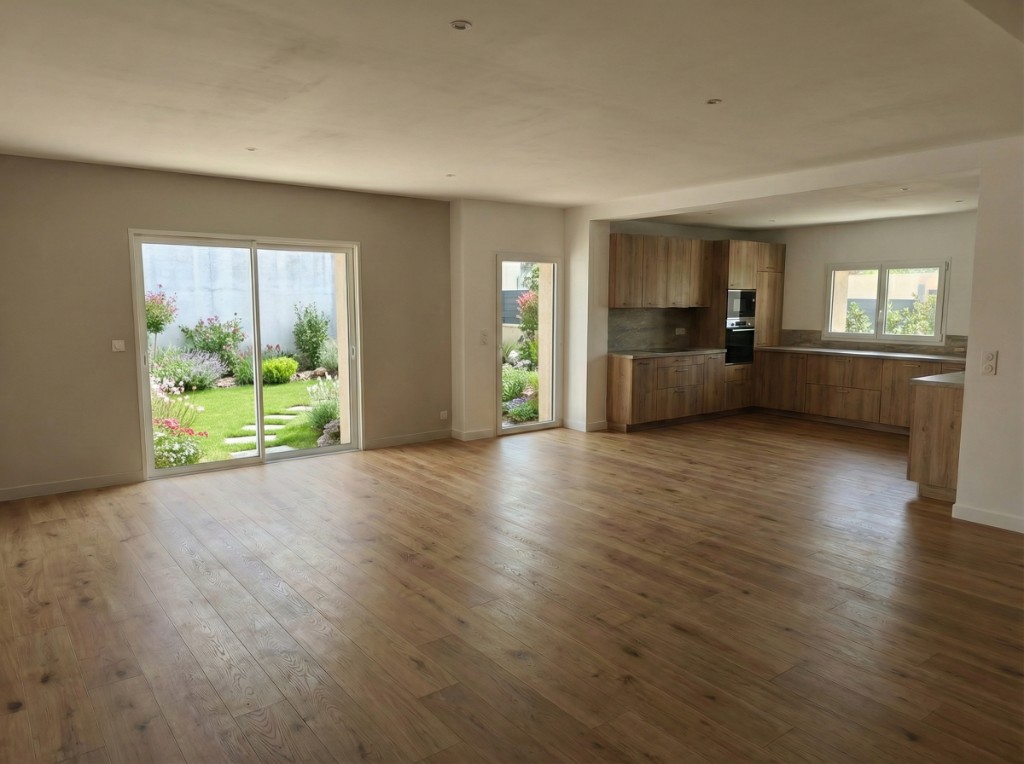
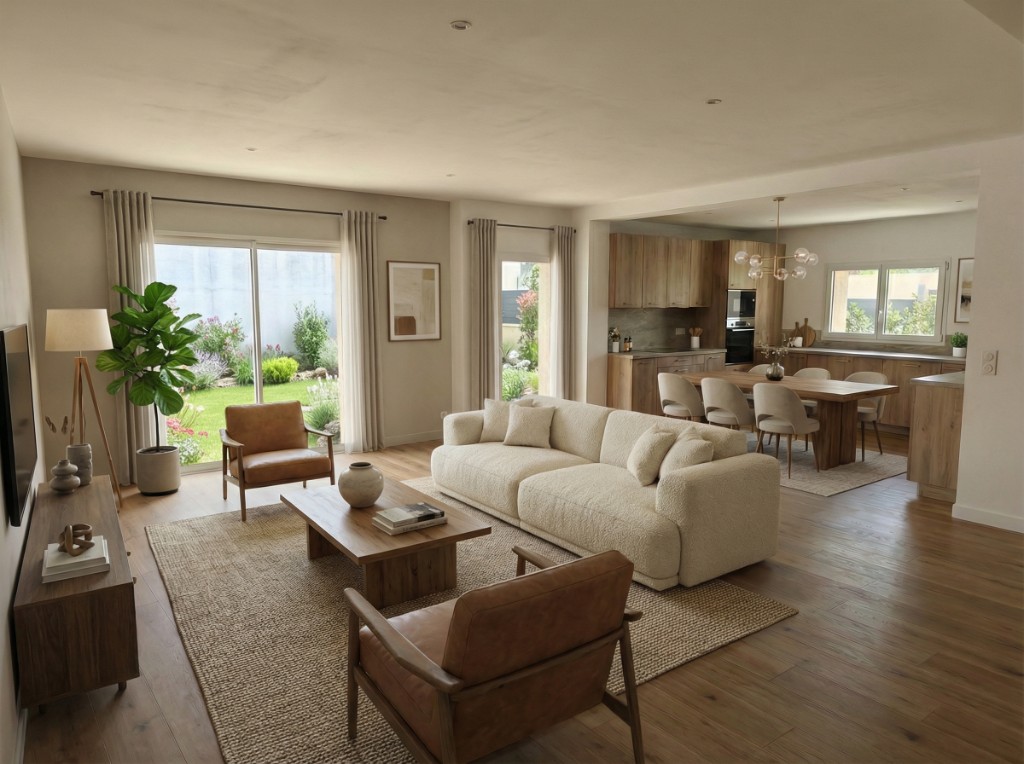
Buyers buy what they can imagine living in. An empty room forces them to do mental work: how big is it, where would the bed go, does a sofa even fit? Many simply scroll to the next listing. Staging removes that friction before the buyer ever books a visit.
The mechanism is not mysterious. On a portal, the hero image decides whether someone clicks. Inside the listing, the room photos decide whether they save it, share it, or request a viewing. Staged photos improve each of those steps, which is why they tend to shorten time on market even though nothing about the physical property changed.
In the US, the National Association of Realtors' 2023 Profile of Home Staging found that 81% of buyers' agents said staging made it easier for buyers to visualize a property as their future home. Virtual staging delivers that same visualization benefit at a fraction of the cost, which is what makes it viable for mid-market and rental listings, not just luxury homes.
Why empty rooms underperform
Empty rooms feel smaller than they are, exaggerate every imperfection — scuffed skirting, a stain on the carpet, a cable on the wall — and give buyers zero reference for furniture scale. An empty listing also signals 'nobody is looking after this', which quietly lowers the price buyers are willing to pay.
How to measure the effect on your own listings
You do not need a study to prove it for your market. Take a live listing with empty photos, note the portal views, saves, and enquiries over seven days, then swap in staged images and compare the following seven days. Most agents see the difference in the click-through rate on the hero image first, then in enquiries. Keep a simple spreadsheet and you will have your own numbers to show sellers.
How virtual home staging works with PhotoStaging
PhotoStaging is built so that staging a room takes one click, not a design session. The prompts that describe furniture, layout, and lighting are already written for real estate listings — you choose the room type and a style, and the AI does the rest. Here is the whole workflow:
One-click virtual home staging in PhotoStaging
The full workflow: upload the empty room, choose a style, download the staged image.
- upload the original listing photo (phone photos work — see the smartphone guide)
- pick the room type and a style, or upload a reference image with style by reference
- wait about 20–30 seconds for the staged image
- if you want a different look, regenerate with another style — each attempt uses one credit
- download the full-resolution JPEG and publish it to your portals and social channels
Apply photo enhancement before staging
If the input photo is dark, has mixed white balance (orange lamps plus blue daylight), or a flat grey sky through the window, run real estate photo enhancement first. Staging inherits the light of the original photo, so a cleaner input produces a more believable staged output.
If an image is difficult
Odd angles, heavily cluttered rooms, or unusual layouts occasionally need a second attempt or a small change of prompt. PhotoStaging support answers on WhatsApp, so you can send the image and get a suggestion rather than guessing.
How long does virtual staging take?
With an AI tool, a single room takes roughly 20–30 seconds to generate. A full listing — hero shot, living room, kitchen, two or three bedrooms — is usually finished in one sitting of 10–15 minutes, including reviewing the results and regenerating one or two rooms you want to tweak. That means you can photograph a property in the morning and publish staged images the same afternoon.
Traditional staging runs on a very different clock: a site visit, a quote, furniture delivery scheduled around the stager's calendar, then a photo shoot after everything is in place. Three to ten days is typical, and every one of those days is a day the listing is not live.
A few things affect how long virtual staging takes in practice:
- how many rooms you stage per listing (stage the hero image and main rooms first)
- whether you need photo enhancement before staging (adds about 20 seconds per image)
- how many style variations you try before settling on one
- how organized your source photos are — batching one listing at a time is fastest
Do virtually staged photos look realistic?
They can, and with current AI they usually do — as long as the source photo is decent, the furniture scale is believable, and the style matches the architecture. The goal is not a fantasy render; it is a listing photo that looks like a great photographer shot a nicely furnished room.
Realistic staging keeps the original architecture and light direction intact. Shadows fall the same way they do in the empty photo, furniture sits flat on the floor with the correct perspective, and nothing blocks windows, doors, or built-ins. Buyers should feel the room is both trustworthy and aspirational.
Why some staged photos look fake
Almost every unconvincing staged image comes from one of these avoidable mistakes:
- furniture that is too large or too small for the room
- lighting on the furniture that does not match the window light in the photo
- over-styling a small room with too many objects
- mixing conflicting styles between rooms of the same listing
- staging a photo that was already dark, blurry, or badly distorted
How to get believable results every time
Start from a clean, well-lit base photo. Choose one style direction for the whole listing and keep room-level variation minor. Review each image at full size before publishing — look at floor contact, shadows, and whether anything overlaps a window or door. If a result is off, regenerate rather than publish it. Most buyers notice a professional finish, not the technique; clear disclosure where required keeps trust high.
Can you choose the furniture style?
Yes. In PhotoStaging you can pick a broad direction — Scandinavian, modern, transitional, minimal, coastal — and the pre-built prompts handle the details like palette, materials, and decor. When a preset is not specific enough, you upload a reference photo and the AI matches that look instead. That is the style by reference workflow, and it is the fastest way to keep every listing in your portfolio visually consistent.
Choose the style for the buyer, not for your own taste. A rough guide:
- Scandinavian: broad appeal, soft warmth — the safe default for most apartments
- Modern: clean lines, urban feel — city flats and new builds
- Transitional: balanced and slightly softer — family homes and suburban listings
- Minimal: fewer pieces, more floor visible — compact rooms and studios
- Coastal or rustic: only when the location and architecture support it
Keep one style per listing
Use a single core style across all rooms and vary only small details (a different accent color in the bedroom, for instance). A listing where the living room is industrial and the bedroom is farmhouse feels random and less credible. For a deeper comparison of the two most popular directions, read Scandinavian vs modern staging for listings, and see best virtual staging styles for empty rooms for room-by-room recommendations.
Room-by-room staging guides
Each room has its own rules — bedrooms sell calm, living rooms sell space, kitchens sell cleanliness. These guides go deeper on layout, style, and the photo angles that work for each:
Staging by property type
The basics do not change, but the priorities do. A vacant house needs a publishing order and one consistent style; a rental needs honesty about what the tenant actually gets; commercial space needs fit-out scenarios rather than furniture. These guides cover the differences:
Best practices and disclosure rules
Believable staging is consistent, realistic in scale, and aligned with the target buyer. A few habits keep quality high across a whole portfolio:
- keep style consistent across all rooms of the same listing
- match furniture scale to the real dimensions of the room
- avoid over-furnishing — buyers still need to read the space
- never add or remove permanent features (walls, windows, fitted kitchens) — that is misrepresentation, not staging
- publish the empty original alongside the staged version when portal rules or local regulation require it
- label staged images ('virtually staged') in the caption or listing text where required
Is virtual staging allowed on portals and in ads?
In most markets, yes, provided you disclose it. Rules vary by country and by portal — some MLSs in the US require a 'virtually staged' label, some European portals have no formal rule but expect the empty photo to be available. The full breakdown is in can you use virtual staging images in portals and ads.
What virtual home staging costs
Traditional staging is typically quoted per month with a setup fee, and for a three-bedroom home it easily runs into four figures over the life of a listing. Virtual staging is priced per image. In PhotoStaging, the Starter plan is €29/month for 100 image credits (or €290/year for 1,200), and the Pro plan is €69/month for 300 credits (€690/year for 3,600) — roughly €0.19–€0.24 per staged image on annual billing. A full listing of six rooms comes to less than €2. New accounts get 10 free credits to test on a real listing.
The detailed comparison, including scenarios for a single listing and for a team doing 20 listings a month, is in virtual staging vs traditional staging cost.
How to get started
Pick one live listing that is currently empty or badly furnished. Enhance the photos if they need it, stage the hero image and the two or three main rooms, and swap them into the portal. Watch the enquiries over the next week. If you are still comparing tools, the best virtual staging software for 2026 guide puts PhotoStaging side by side with VirtualStagingAI, BoxBrownie, and ApplyDesign, and the virtual home staging software page shows the workflow, pricing, and demo video in one place. When you are ready, start with PhotoStaging — your first images are free.
Frequently asked questions
Is virtual home staging allowed on real estate listings?
Yes, in most regions. Some markets require staging to be clearly disclosed in the listing description or image caption, and some portals ask for the unstaged photo to be available. Always follow local real estate regulations and portal rules.
Do virtually staged photos look real?
With modern AI tools, yes. Lighting, perspective, and scale are preserved and the output is close to photorealistic when the source photo is decent. Labelling images as virtually staged is recommended for transparency.
How long does virtual home staging take?
About 20–30 seconds per image with PhotoStaging. A full listing is usually done in 10–15 minutes including review, versus three to ten days for traditional staging.
How much does virtual staging cost per image?
Roughly €0.19–€0.24 per image on PhotoStaging annual plans (€290/year for 1,200 credits, €690/year for 3,600). Monthly plans start at €29 for 100 credits. New accounts get 10 free credits.
Can I choose the furniture style?
Yes. Pick a preset direction like Scandinavian or modern, or upload a reference image and the AI matches that look. Keep one style per listing for the most credible result.
Does virtual staging work for luxury listings?
Yes, especially when paired with a custom interior style matched to your brand and target buyer. Luxury listings benefit most from careful scale and material matching.
Ready to start?
Create listing-ready visuals in minutes. No credit card required.